
Max Intelligence vs. regular Chat
Overview
Littlebird has more than one gear. Depending on what you're trying to accomplish, you can choose the level of intelligence that fits the task—from fast, everyday answers to deep, structured reasoning across multiple steps. This article covers the two main modes you'll use most: Max Intelligence and regular Chat.
The short version
Regular Chat | Max Intelligence | |
|---|---|---|
Best for | Everyday questions, quick tasks, drafts | Complex research, multi-step projects, high-stakes work |
Speed | Fast | Slower (thinks more before responding) |
Depth | Advanced AI intelligence | Extended reasoning across more sources |
Daily limit | Included in all plans | Separate daily allowance (Plus and Pro) |
How to activate | Default | Click the Max button in the chat bar, or press Ctrl+T |
Regular Chat
Regular Chat is your default mode—and for most things, it's exactly what you need. It's powered by advanced AI intelligence and responds quickly. It has full access to your screen context, memory, integrations, and everything else Littlebird knows about you.
Use Regular Chat for:
Everyday questions and quick lookups
Drafting emails, messages, or short documents
Summarizing something on your screen
Checking your calendar or prepping for a meeting
Brainstorming ideas without needing exhaustive analysis
Simple back-and-forth conversations and follow-ups
If you're not sure which mode to use, start here. Regular Chat handles the vast majority of tasks well.
Max Intelligence
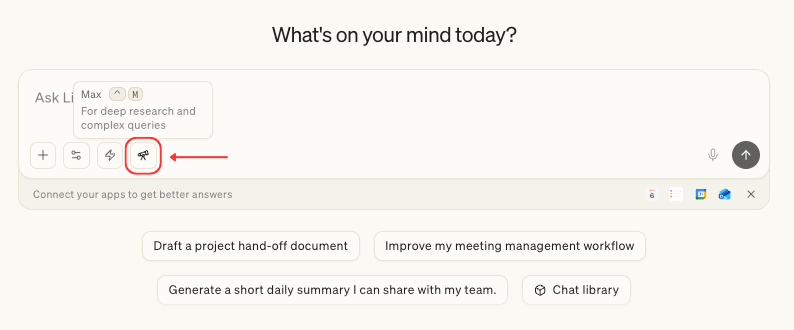
Max Intelligence gives Littlebird significantly more reasoning power. When it's on, Littlebird takes more time before responding—working through the problem in a more structured, multi-step way before giving you an answer. The result is a response that's more thorough, more nuanced, and better suited for complex work.
You'll notice a more detailed "thinking process" view when Max Intelligence is active, reflecting the additional steps Littlebird is working through on your behalf.
Use Max Intelligence for:
In-depth research that requires synthesizing across multiple sources
Complex analysis—financial, legal, technical, or strategic
Long-form writing where structure, accuracy, and nuance all matter
Multi-step projects that unfold across several requests in one session
High-stakes work like strategy docs, project scoping, or executive briefings
Tasks where you want Littlebird to reason through the problem visibly and in depth
A tip for getting the most out of Max Intelligence: It gets smarter as your session grows. The more context and back-and-forth you build within a single conversation, the better it performs. If you're working through something complex, stay in the session and keep building—a long, multi-step conversation in Max Intelligence will outperform several short, disconnected ones.
How to switch modes
Switching is easy and non-disruptive:
To turn on Max Intelligence: Click the Max button in the chat input bar, or press Ctrl+T
To return to regular Chat: Click the button again, or press Ctrl+T to toggle off
You can switch modes at any point mid-conversation without affecting your prior responses.
Usage and availability
Regular Chat is available on all plans. Max Intelligence is available on Plus and Pro plans, with its own daily allowance separate from your standard chat capacity. Daily limits reset at midnight local time.
Note: If you're on a Free plan, you won't see the Max option. Upgrade to Plus or Pro in Settings > Subscription to unlock it.
Not sure which to use? Here's a simple rule of thumb
If you need it fast—use Regular Chat. It's quick, smart, and handles the overwhelming majority of tasks well.
If the stakes are high or the task is complex—use Max Intelligence. When you need Littlebird to really think something through, that's what Max Intelligence is for.
Related articles