
Setting up a Routine no longer means filling in a form. Describe it in Chat — “turn this into a weekday morning briefing at 8:30” — and Littlebird creates it. You can change the prompt, schedule, or notifications on a Routine you already have the same way, and ask what one is set to before you change anything. Here is a prompt to get you started -
#8853#8911Report a bug by asking
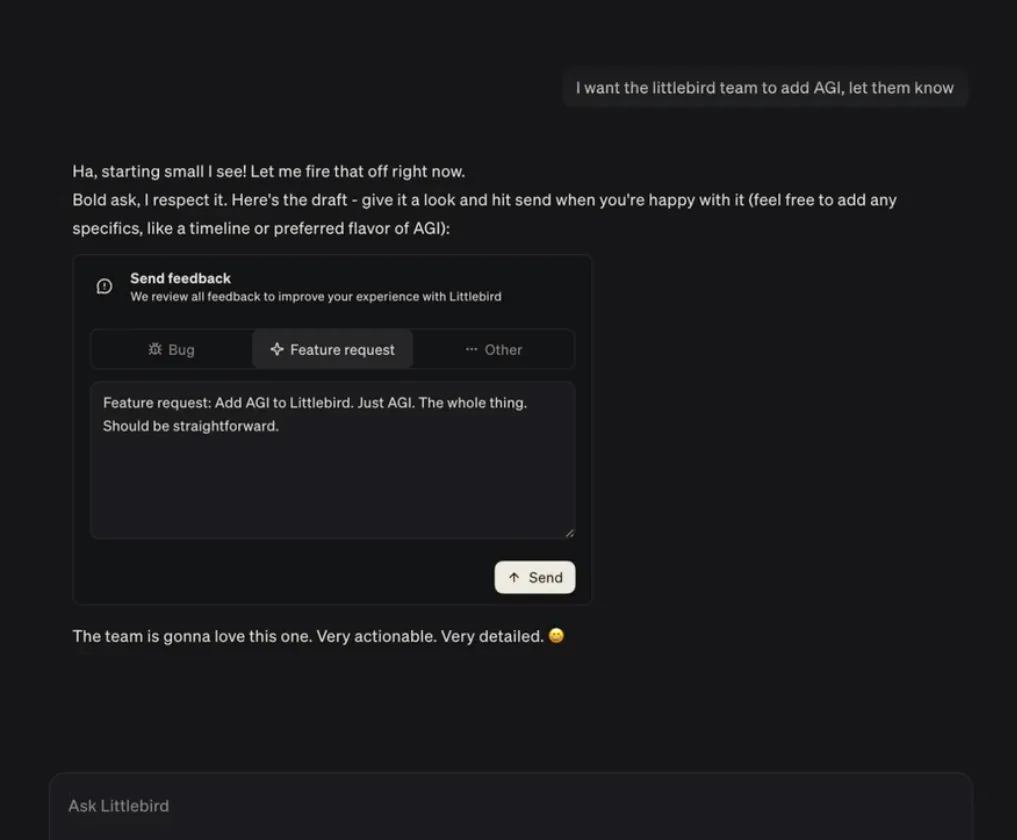
Something broken, or an answer that missed the mark? Say so in Chat — “report a bug: my meeting notes did not sync this morning” — and Littlebird drafts the report for you. Read it over, send it, and carry on. It works the same way for a feature you wish existed, or an answer worth flagging as poor.
#9062Your call on meeting prep and recording
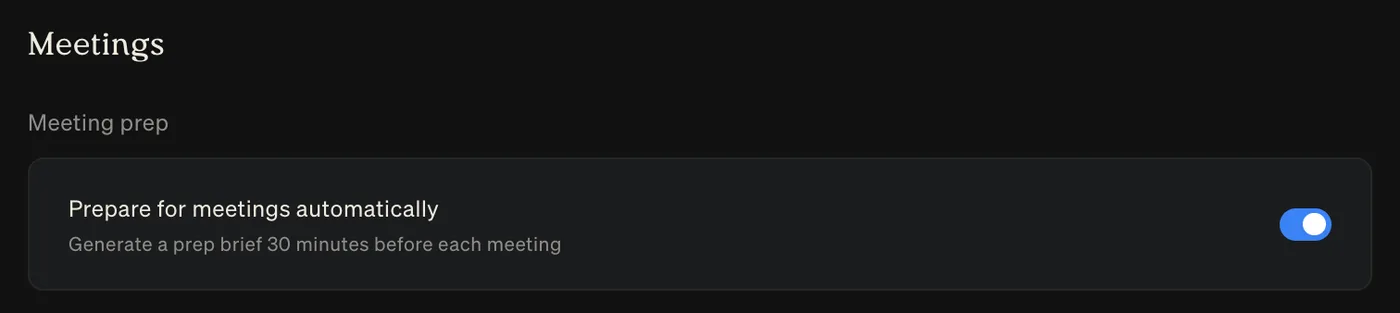
You can now enable automatic meeting prep in Settings → Meetings, and get your meeting prep 30 minutes before the meeting starts.
You can also turn on automatic recording, so you do not have to remember to start recording every time. It’s also possible to exclude apps from being recorded automatically.
#8823#8848Have it read to you
On mobile, Littlebird can read things out loud so you can listen with your phone in your pocket. In Chat, tap the play button on a finished reply. In routine reports and meeting notes, choose Read aloud from the top-right menu — for a meeting it reads whichever tab you are on, whether that is the summary, the transcript, or your own notes. Tap again to stop.
#6568Improvements
- Meeting
The chat composer now sits at the bottom of the meetings list, so you can ask about several meetings at once without opening a single note. A history menu keeps recent conversations from that page grouped by day, and the panel remembers whether you prefer it docked or floating.
#8408#9005 - Integrations
Connected accounts have their own controls in Settings → Integrations. Pause, remove, or reconnect one without touching the others, and a Disabled badge shows when one is switched off.
#7870 - Chat
Attach a PDF and you can open it in a preview to check the right file before you send it.
#8878 - Artifacts
You can download an artifact straight from its full view instead of going back to the chat it came from.
#8907 - Teams
Every member of a team can now open team analytics from the profile menu, not just admins. The Usage tab is called Analytics.
#9061 - Usage
The usage bar is simpler, you can reach it from the profile menu, and it now breaks your usage down by chat mode.
#9061 - Meeting
In a project chat, questions about meetings follow the project’s awareness setting, so Littlebird searches only that project’s meeting notes when you have limited it to them.
#8768#8769 - Meeting
After you stop a recording yourself, Littlebird points out the Generate summary button so it is easier to find.
#9027 - Meeting
The Meeting Notes list shows a single, clearer empty state, with a way to connect a calendar when you have not connected one.
#8991 - Mobile
You can add a chat to a project from the mobile composer.
#8631 - macOS
If Littlebird cannot update itself — because it is running from the disk image or somewhere it cannot write — it now explains why and offers to move itself to Applications, instead of asking for your password every fifteen minutes.
#8892 - Chat
Every chat mode shows a description, and their keyboard shortcuts stay visible and aligned in the menu.
#8979#8995#8997 - Hummingbird
Mentioning an app is tidier: no duplicated window and app names, no stray spacing when you select the text, and less clutter when you mention several apps.
#8867
Fixes
- macOS
Fixed Littlebird signing you out after your Mac has been asleep.
#8980 - Meeting
A meeting summary that had already been written no longer disappears from the app while it is being regenerated.
#9013 - Meeting
Asking about a meeting no longer sends Littlebird round in circles when it calls a meeting tool the wrong way.
#8601 - Meeting
Automatic meeting detection recognises an app that was already running when Littlebird started.
#7767 - Meeting
Transcripts from a mobile recording upload reliably, including recordings that are mostly silence.
#8289 - Routines
Opening a chat from a routine report works again if you are on an older version of the app.
#8985 - Routines
The Routines and reports screens show a loading state instead of looking empty while they load.
#8537 - Artifacts
An artifact card no longer goes missing from a chat when the file behind it takes a while to arrive.
#8952 - Chat
Stopping a reply mid tool call no longer crashes the chat.
#8981 - Chat
Images you send more than once in a conversation are no longer dropped from it.
#9009#9084 - Chat
Your chats are no longer empty after Littlebird rebuilds its local copy of them.
#8712 - Chat
Messages no longer flash into place as a chat opens, the placeholder stays put in the collapsed composer, and spacing around your own messages is even.
#8984#8999#9001#9008#9023#9029 - Hummingbird
The Hummingbird shortcut works with Caps Lock on, the composer takes focus when the window appears, clicks pass through again after you close a thread, and the window keeps its size when you reopen it on a second monitor.
#8863#8866#8870#8871 - Hummingbird
The mouse keeps working after you open an action menu, and long conversations no longer jump to the top on their own.
#8918#8921#8945 - Integrations
A connection you abandoned partway no longer sits at Pending forever with no way to remove or retry it.
#7869 - Integrations
Choosing a calendar issue type uses a proper menu, and text in connection dialogs is aligned.
#9033#9036 - MCP
Mem0 completes sign-in instead of failing during registration.
#9065 - iOS
Images upload reliably, and an upload that stalls gives up and tells you rather than hanging.
#8972#9003 - iOS
Starting dictation stops music playing through AirPods instead of leaving it running behind you.
#8904 - iOS
Signing in no longer drops you back out when a token refresh is interrupted.
#8349 - Mobile
The sign-in screen no longer flickers between the email and code steps, and it stays put if a code fails.
#8801#8954#8955 - Mobile
Images you attached appear when you come back to a chat, and long threads use less memory and scroll more smoothly.
#8671#8775#8829#8830#8854 - Android
Opening a chat connects faster after the app has been in the background.
#6347 - Android
The Favourites and Recents headings in the sidebar are no longer tappable as though they were chats.
#8799